
Radish Health
Designing a Conversation-First Care System
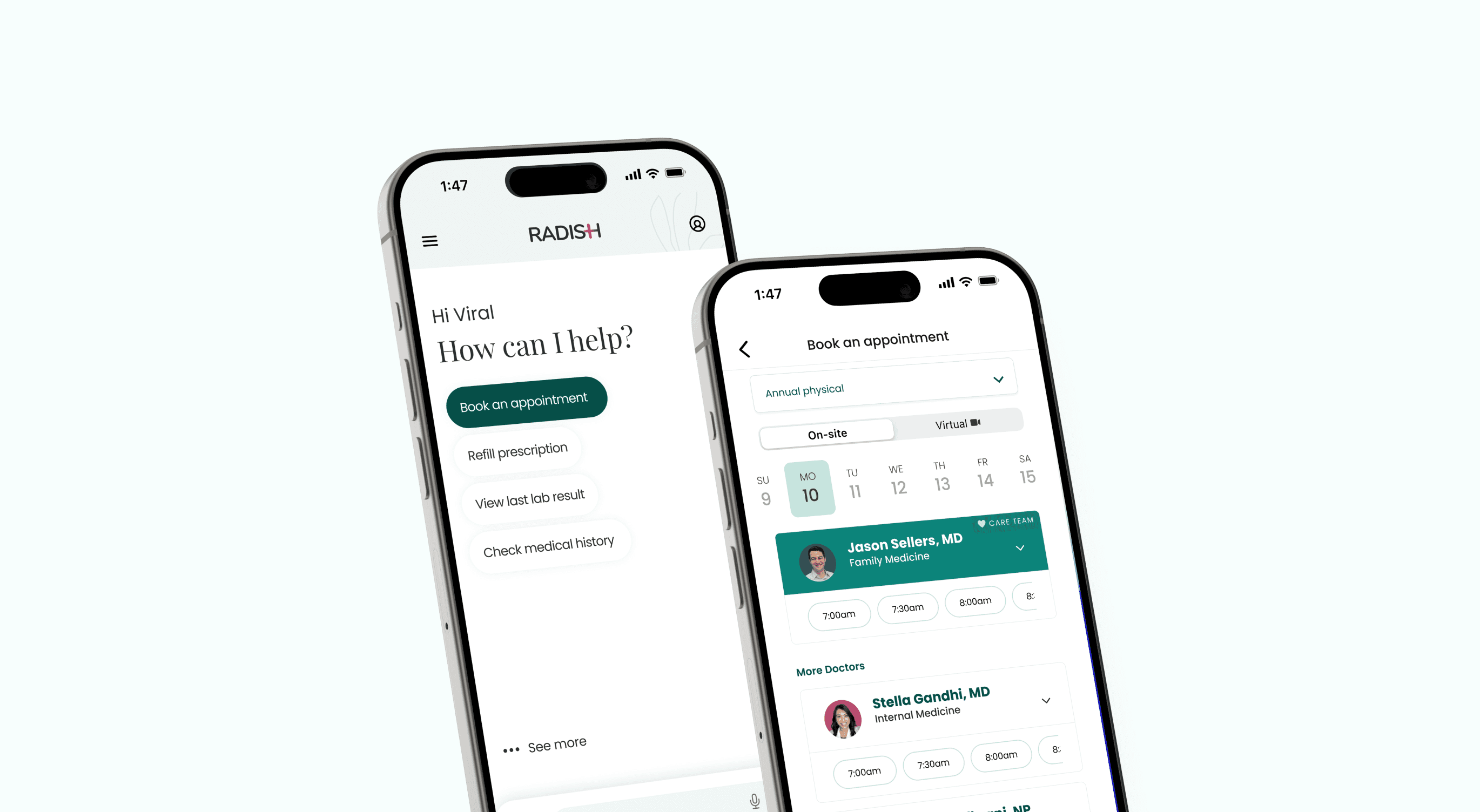
Redesigning an AI-assisted primary care platform for messaging clarity, and appointment state design.
Role
Lead Product Designer
Lead Product Designer
Platform
Mobile (iOS/ Android), Responsive Web
Mobile (iOS/ Android), Responsive Web
Team
CEO, PM, Engineer
CEO, PM, Engineer
Timeline
3 months
3 months
Virtual-first resolution
75%
Booking confusion
reduced
Care journey mapped in
8 states
Key Contributions
UX Strategy
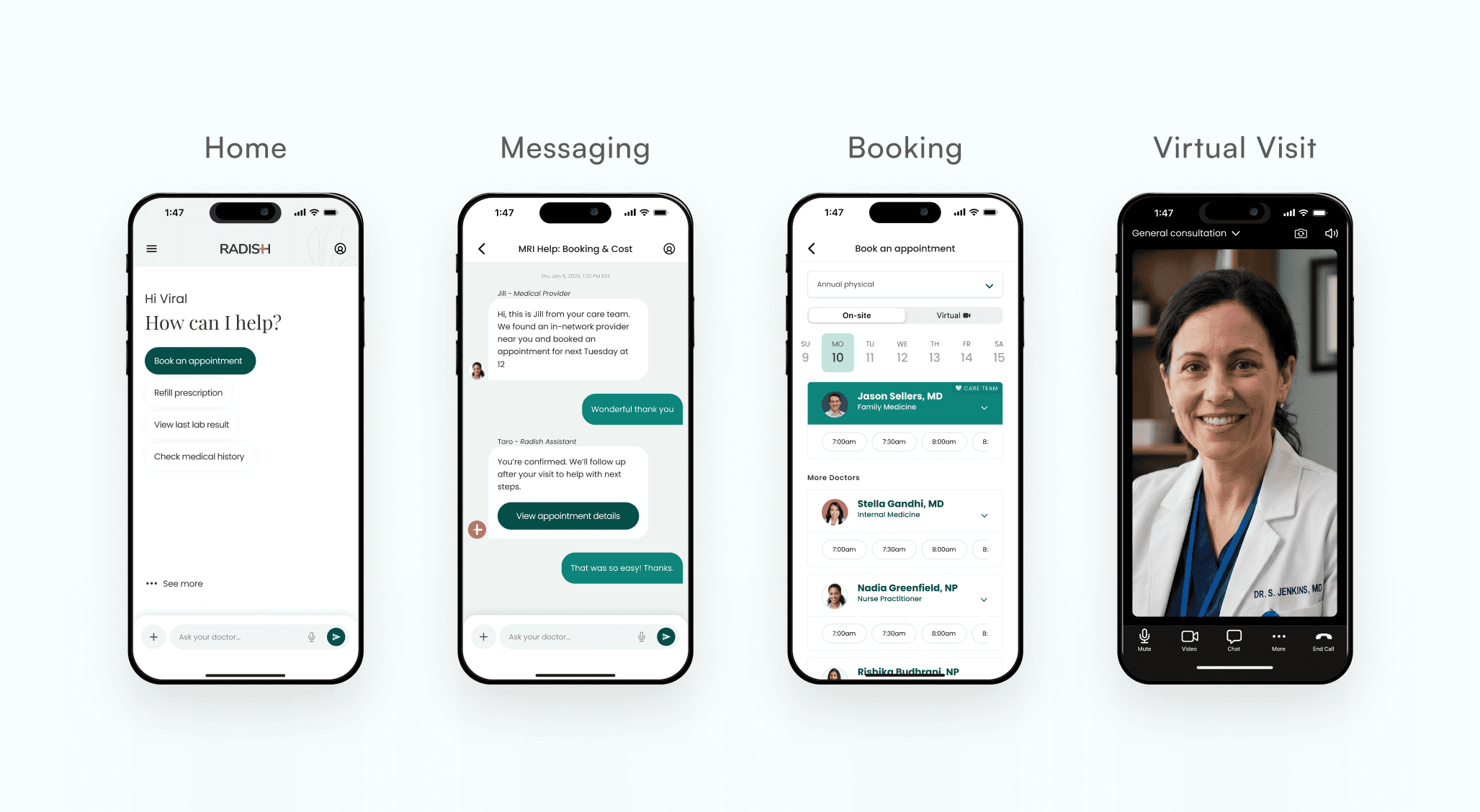
Led UX strategy across booking, architecture, and appointment state design, aligning parallel briefs into one coherent system.
Homepage Architecture
Revised the homepage around a conversation-first model, removing competing navigation and introducing context-aware quick actions.
Booking Clarity
Defined and selected the persistent toggle model, surfacing virtual vs. in-person selection before any time commitment.
Trust & State Design
Mapped seven appointment states from confirmation to post-visit, clarifying AI-to-provider handoffs to reinforce trust and reduce uncertainty.

Business Context
Radish Health is an AI conversation-driven healthcare app designed to make care access clearer, more connected, and easier to navigate.
Clinical clarity
Reduce virtual vs. in-person booking confusion and make the correct choice easier to make.
Chat-first model
Reframe the product around messaging as the primary interaction surface, not one feature among many.
Scale & Accessibility gaps
Support white-label deployments while maintaining WCAG AA contrast and a coherent system across surfaces.
Business Context
Radish Health is an AI conversation-driven healthcare app designed to make care access clearer, more connected, and easier to navigate.
Clinical clarity
Reduce virtual vs. in-person booking confusion and make the correct choice easier to make.
Chat-first model
Reframe the product around messaging as the primary interaction surface, not one feature among many.
Scale & Accessibility gaps
Support white-label deployments while maintaining WCAG AA contrast and a coherent system across surfaces.
Problem 1 - Appointment Selection
Appointment type was easy to miss.
Solution
Patients could commit to a time before understanding whether the visit was virtual or in-person. Visit type now precedes time selection and persists throughout the flow.
Problem 1 - Appointment Selection
Appointment type was easy to miss.
Solution
We fixed that by moving visit type selection ahead of time selection and making it persist throughout the booking flow.
Before
1
Date selection feels secondary
"Today / Tomorrow / More dates" hides the week, patients can't scan availability at a glance.
2
Visit type buried inside the card
Virtual and In-Person sections are stacked together, the format choice gets lost in the slot list.
3
Easy to tap the wrong format
Times for both modalities sit one swipe apart, a wrong tap commits the patient to the wrong visit type.
After
1
Explicit On-site / Virtual toggle
Visit type is a deliberate choice before any times appear, it can't be skipped or missed.
2
Full week, always visible
Seven-day strip promotes date to a first-class decision, patients can scan availability instantly.
3
One unambiguous slot list
With format already locked, every tap resolves to a single intent, no wrong-mode taps possible.
Outcome
Mode (virtual vs. on-site) is now resolved upstream of time selection. The patient commits to the high-stakes decision first, then to a scannable, unambiguous slot list, eliminating the wrong-format taps surfaced in usability testing.
Problem 1 - Appointment Selection
Appointment type was easy to miss.
Solution
Patients could commit to a time before understanding whether the visit was virtual or in-person. Visit type now precedes time selection and persists throughout the flow.
Before
1
Date selection feels secondary
"Today / Tomorrow / More dates" hides the week, patients can't scan availability at a glance.
2
Visit type buried inside the card
Virtual and In-Person sections are stacked together, the format choice gets lost in the slot list.
3
Easy to tap the wrong format
Times for both modalities sit one swipe apart, a wrong tap commits the patient to the wrong visit type.
After
1
Explicit On-site / Virtual toggle
Visit type is a deliberate choice before any times appear, it can't be skipped or missed.
2
Full week, always visible
Seven-day strip promotes date to a first-class decision, patients can scan availability instantly.
3
One unambiguous slot list
With format already locked, every tap resolves to a single intent, no wrong-mode taps possible.
Outcome
Mode (virtual vs. on-site) is now resolved upstream of time selection. The patient commits to the high-stakes decision first, then to a scannable, unambiguous slot list, eliminating the wrong-format taps surfaced in usability testing.
Problem 2 - Homepage
Chat as the home, not a feature.
Solution
The Chat tab carried no special weight, no persistent input, no context on load. The brief: give it homepage-level treatment, with care context already surfaced.
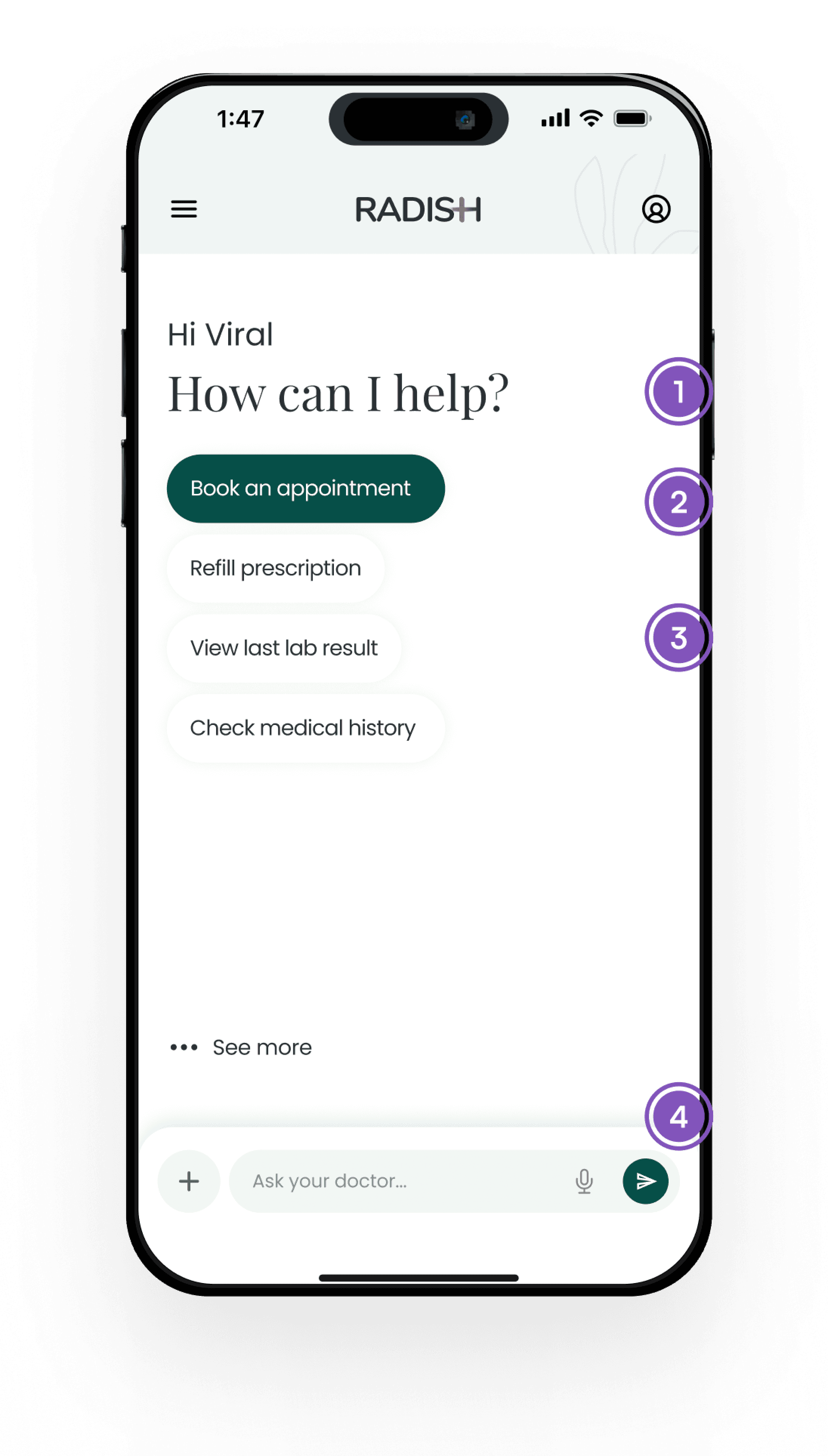
Homepage redesign
1
Conversation as the surface
Frames the screen as a care conversation, not a navigation page.
decision hierarchy
2
Supporting quick actions
Common next steps sit below the main prompt, giving patients shortcuts without turning the screen into a menu.
Action hierarchy
3
Context-aware suggestions
Suggested actions surface based on the patient’s current state, making refills, labs, and medical history feel immediately relevant.
Context-aware
4
Persistent input layer
The conversation layer stays available as the patient moves through different care moments.
ALWAYS-ON
Context-aware quick actions
The chip set is not a static menu, it shifts with the patient's care moment. The same surface surfaces different actions before, during, and after a visit.
BOOKED · VISIT SCHEDULED
Upcoming: Dr. Reyes — Thu 3pm
Complete profile
Reschedule
DAY OF · VISIT IMMINENT
Join visit
Refill prescription
Pre-visit checklist
POST VISIT · RECAP WINDOW
View results
Book follow-up
Upload document
Outcome
Chat moved from a card on the homepage to the homepage itself. Patients land on a conversational surface care context already loaded, the most likely next action surfaced, and the input layer always within reach.
Chat moved from a card on the homepage to the homepage itself. Patients land on a conversational surface care context already loaded, the most likely next action surfaced, and the input layer always within reach.
Problem 2 - Homepage
Chat as the home, not a feature.
Solution
The Chat tab carried no special weight, no persistent input, no context on load. The brief: give it homepage-level treatment, with care context already surfaced.
Homepage redesign
1
Conversation as the surface
Frames the screen as a care conversation, not a navigation page.
decision hierarchy
2
Supporting quick actions
Common next steps sit below the main prompt, giving patients shortcuts without turning the screen into a menu.
Action hierarchy
3
Context-aware suggestions
Suggested actions surface based on the patient’s current state, making refills, labs, and medical history feel immediately relevant.
Context-aware
4
Persistent input layer
The conversation layer stays available as the patient moves through different care moments.
ALWAYS-ON
Context-aware quick actions
The chip set is not a static menu, it shifts with the patient's care moment. The same surface surfaces different actions before, during, and after a visit.
BOOKED · VISIT SCHEDULED
Upcoming: Dr. Reyes — Thu 3pm
Complete profile
Reschedule
DAY OF · VISIT IMMINENT
Join visit
Refill prescription
Pre-visit checklist
POST VISIT · RECAP WINDOW
View results
Book follow-up
Upload document
Outcome
Chat moved from a card on the homepage to the homepage itself. Patients land on a conversational surface care context already loaded, the most likely next action surfaced, and the input layer always within reach.
Problem 3 - Dynamic Journey
The homepage needed to change with the care moment.
Solution
I designed the homepage to adapt across the care journey, surfacing the right action, reassurance, and provider access at each moment.
Problem 3 - Dynamic Journey
The homepage needed to change with the care moment.
Solution
I designed the homepage to adapt across the care journey, surfacing the right action, reassurance, and provider access at each moment.
Care journey states
1
Booked
Booked
2
Upcoming
Upcoming
3
Join Soon
Join Soon
4
Waiting
Waiting
5
In Visit
In Visit
6
Post-Visit
Post-Visit
7
HANDOFF
HANDOFF
8
CANCELLED
CANCELLED
Upcoming & handoff details
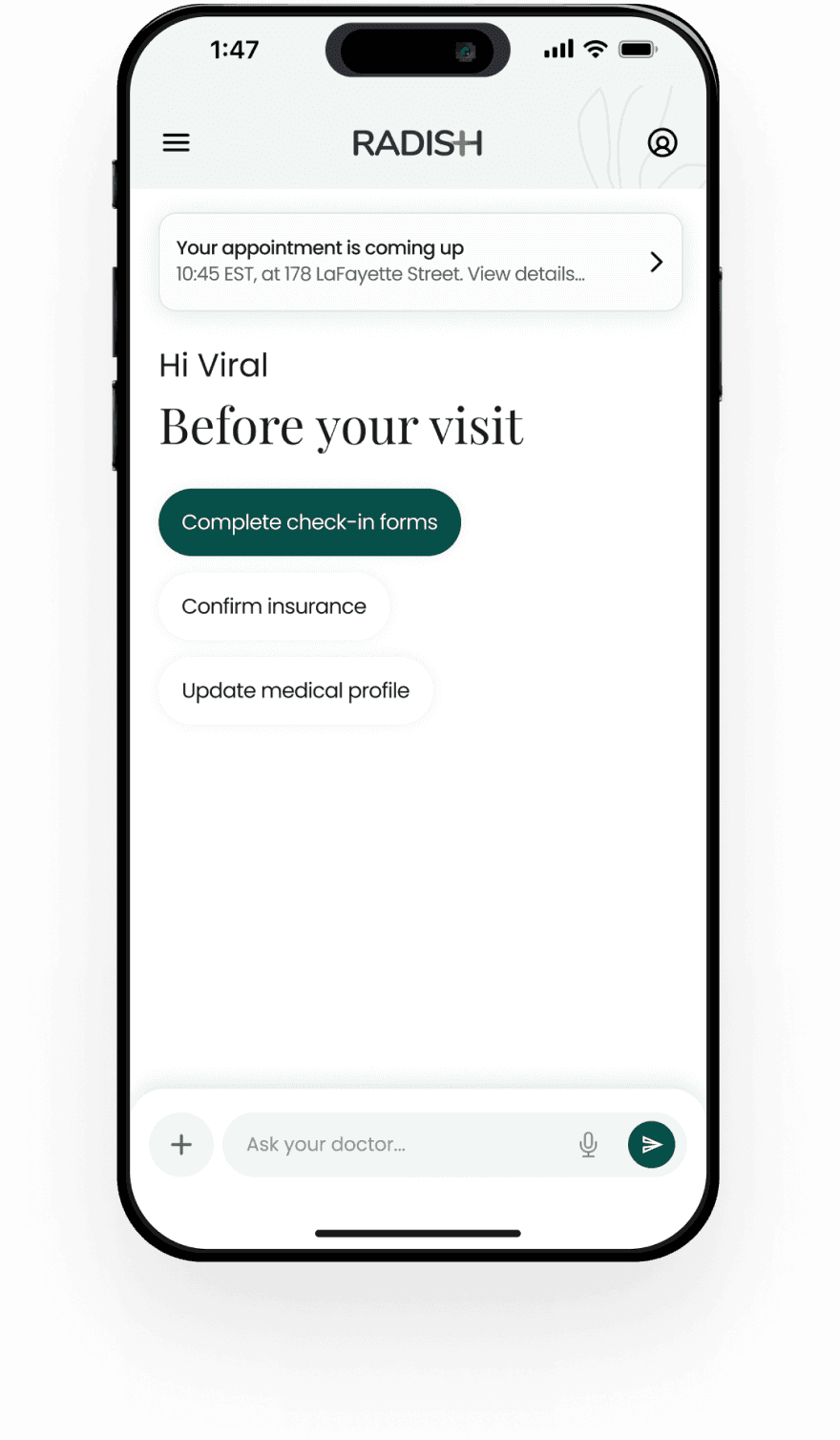
State 02 · UPCOMING
State 02 · UPCOMING
Homepage preps automatically
Homepage preps automatically
As the visit approaches, pre-visit tasks move to the top. The pattern stays familiar; the content adapts.
Primary action
Check-in forms become the filled CTA.
Optional prep
Insurance and profile updates remain available.
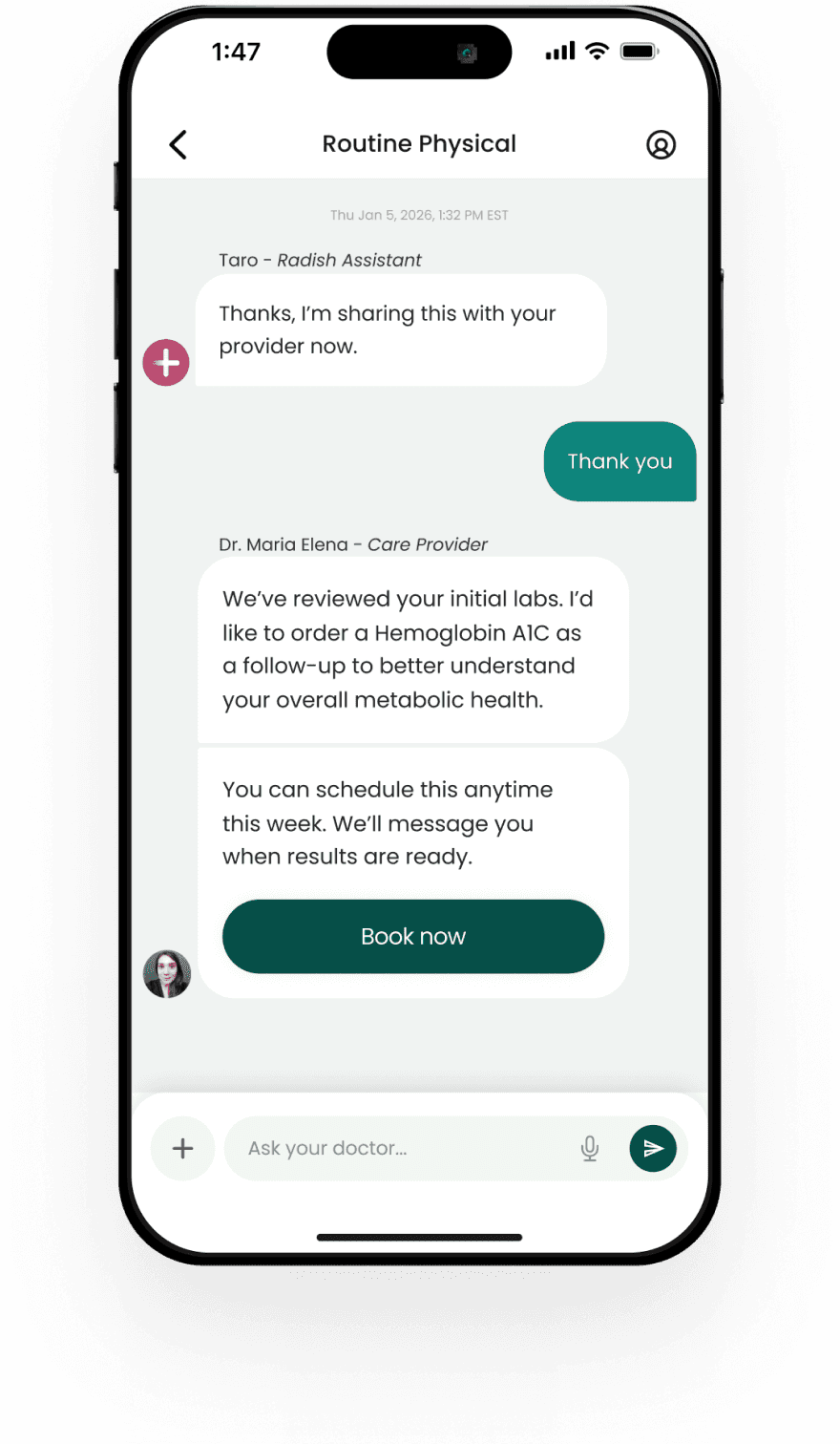
State 07 · HANDOFF
State 07 · HANDOFF
The right person, in reach
The right person, in reach
Provider access lives inside the patient’s active care context, so patients can reach the right person without leaving the flow.
Role clarity
Names and roles make ownership clear
Scoped roster
Only the patient’s active care team appears
Design for trust
Design for trust
Visible accountability over invisible automation
Visible accountability over invisible automation
The Care Team roster names who is involved, what role they play, and how to reach them. Authored language like “Reviewed by your care team” makes accountability visible across automated surfaces.
Design pattern
Design pattern
The state changed, but the interface stayed familiar
The state changed, but the interface stayed familiar
Appointment banners, action pills, roster rows, and the pinned chat input stay familiar as the care context changes. The product adapts without making patients relearn the interface.
Reflection
Resolving these briefs required treating the product as one connected care system. Booking clarity, chat architecture, temporal state design, and care team visibility all reinforced the same goal: helping patients understand what to do next.
The result was a platform that felt less like a portal and more like an ongoing care relationship.
Reflection
Resolving these briefs required treating the product as one connected care system. Booking clarity, chat architecture, temporal state design, and care team visibility all reinforced the same goal: helping patients understand what to do next.
The result was a platform that felt less like a portal and more like an ongoing care relationship.
WHAT WORKED
Decision sequencing in booking reduced ambiguity without adding steps for confident users.
The chip-stack pattern translated cleanly across pre-visit, in-visit, and post-visit states.
Care team scoping made the human layer legible without becoming a directory.
Authored language like “reviewed by your team” made human accountability visible inside automated flows.
Decision sequencing in booking reduced ambiguity without adding steps for confident users.
The chip-stack pattern translated cleanly across pre-visit, in-visit, and post-visit states.
Care team scoping made the human layer legible without becoming a directory.
Authored language like “reviewed by your team” made human accountability visible inside automated flows.
Decision sequencing in booking reduced ambiguity without adding steps for confident users.
The chip-stack pattern translated cleanly across pre-visit, in-visit, and post-visit states.
Care team scoping made the human layer legible without becoming a directory.
Authored language like “reviewed by your team” made human accountability visible inside automated flows.
Decision sequencing in booking reduced ambiguity without adding steps for confident users.
The chip-stack pattern translated cleanly across pre-visit, in-visit, and post-visit states.
Care team scoping made the human layer legible without becoming a directory.
Authored language like “reviewed by your team” made human accountability visible inside automated flows.
WHAT I'D PUSH FURTHER
Formalize a design token library for white-label configuration.
Usability test state transitions, especially join-soon, waiting-room, and post-visit moments.
Validate care team messaging and provider handoff comprehension.
Instrument booking error rate, chat engagement, care completion, and follow-up conversion.
Formalize a design token library for white-label configuration.
Usability test state transitions, especially join-soon, waiting-room, and post-visit moments.
Validate care team messaging and provider handoff comprehension.
Instrument booking error rate, chat engagement, care completion, and follow-up conversion.
Formalize a design token library for white-label configuration.
Usability test state transitions, especially join-soon, waiting-room, and post-visit moments.
Validate care team messaging and provider handoff comprehension.
Instrument booking error rate, chat engagement, care completion, and follow-up conversion.
Formalize a design token library for white-label configuration.
Usability test state transitions, especially join-soon, waiting-room, and post-visit moments.
Validate care team messaging and provider handoff comprehension.
Instrument booking error rate, chat engagement, care completion, and follow-up conversion.
Let's build something together
Let's build something together
Let's build something together
Let's build something together
©2026 Tatiana Studio LLC
©2026 Tatiana Studio LLC
©2026 Tatiana Studio LLC